LinkedIn image design guide
LinkedIn Image Sizes: Banner, Cover Photo, Profile Picture, Post Image and Video
Updated
The recommended LinkedIn banner size for a personal profile is 1584 × 396 pixels, a 4:1 rectangle. As of 2026, use a profile photo at least 400 × 400 pixels and export post graphics separately: a cover image is much wider than a feed image.
Start by identifying the surface you are updating. Personal covers, company covers, image posts, documents, and videos have different layouts. The right file dimensions help, but you also need readable text, room for the profile-photo overlap, and a preview on both desktop and mobile.
LinkedIn banner size and media specifications at a glance
These are recommended design sizes and upload checks as of 2026. Recheck LinkedIn Help before exporting a campaign. In particular, older company-cover templates and some video guidance differ from the current Page and native-post upload specifications.
| Asset | Pixels | Aspect ratio | File guidance | Format |
|---|---|---|---|---|
| Personal cover | 1584 × 396 | 4:1 | Under 8 MB | PNG or JPG |
| Company cover | 1512 × 256 current; 1128 × 191 older template | About 5.9:1 | Up to 3 MB | PNG or JPG |
| Profile photo | 400 × 400 minimum starting canvas | 1:1; circular display | Up to 8 MB | PNG or JPG |
| Landscape post | 1200 × 627 recommended | About 1.91:1 | Check composer limit | PNG or JPG |
| Square / portrait post | 1080 × 1080 / 1080 × 1350 suggested | 1:1 / 4:5 | Check composer limit | PNG or JPG |
| Video | Up to 4096 × 2304 | Depends on composition | Up to 5 GB; see duration below | MP4 is a practical export |
LinkedIn banner size for a personal profile cover photo
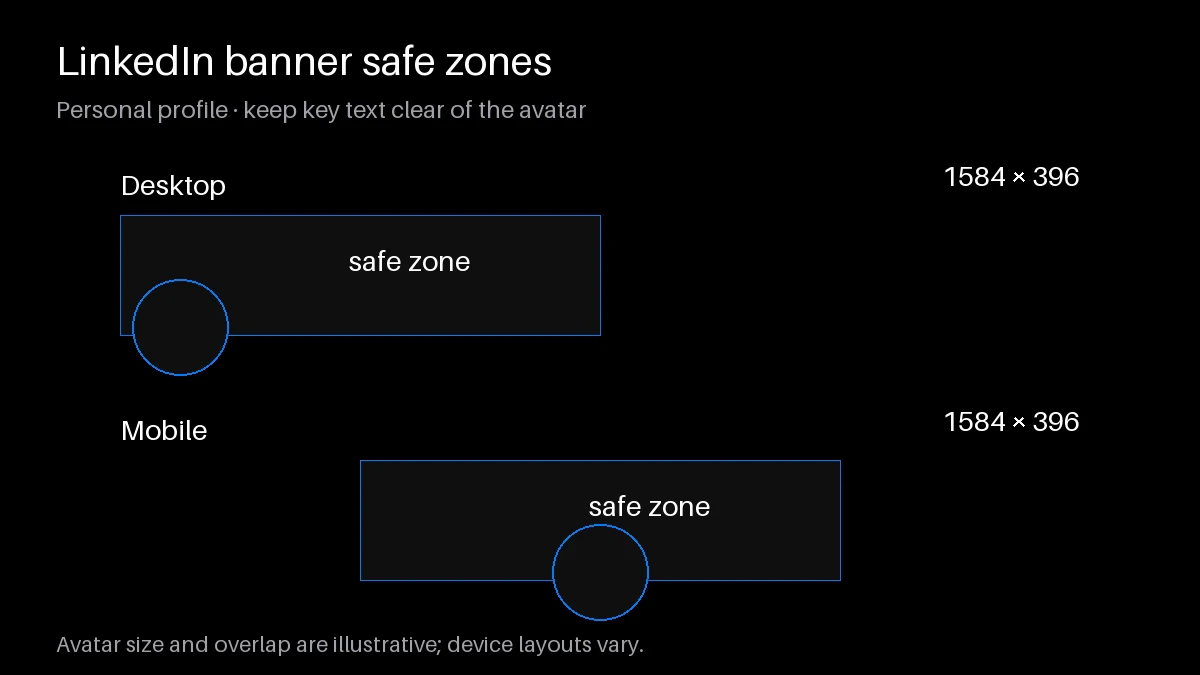
Build your personal cover at 1584 × 396. The profile photo overlaps the left side on desktop; mobile layouts can move the overlap toward the center and crop the cover differently. Keep the lower band free of indispensable text. Place one short professional promise in an open area, then confirm its position in your saved profile.
The LinkedIn banner size is wide enough for a restrained composition, not a miniature slide deck. A consultant might show a simple project image and a short specialty statement. Skip small contact details that visitors cannot read on a phone. Browser width changes the presentation, so treat any downloadable safe-zone template as a starting point rather than a guarantee.
LinkedIn profile picture size
Start with at least 400 × 400 pixels and keep the upload within 8 MB. PNG and JPG are accepted. Use a recent, recognizable likeness with clear lighting; keep the face comfortably inside the circular crop rather than pressing hair or shoulders against the edge.
Preview the picture at the small size used beside comments. A busy background can compete with your face even when the full-size photo looks polished. Crop from the original, avoid excessive sharpening, and keep an unedited copy so future crops do not accumulate compression artifacts.
LinkedIn post image size: single, multi-image, and document posts
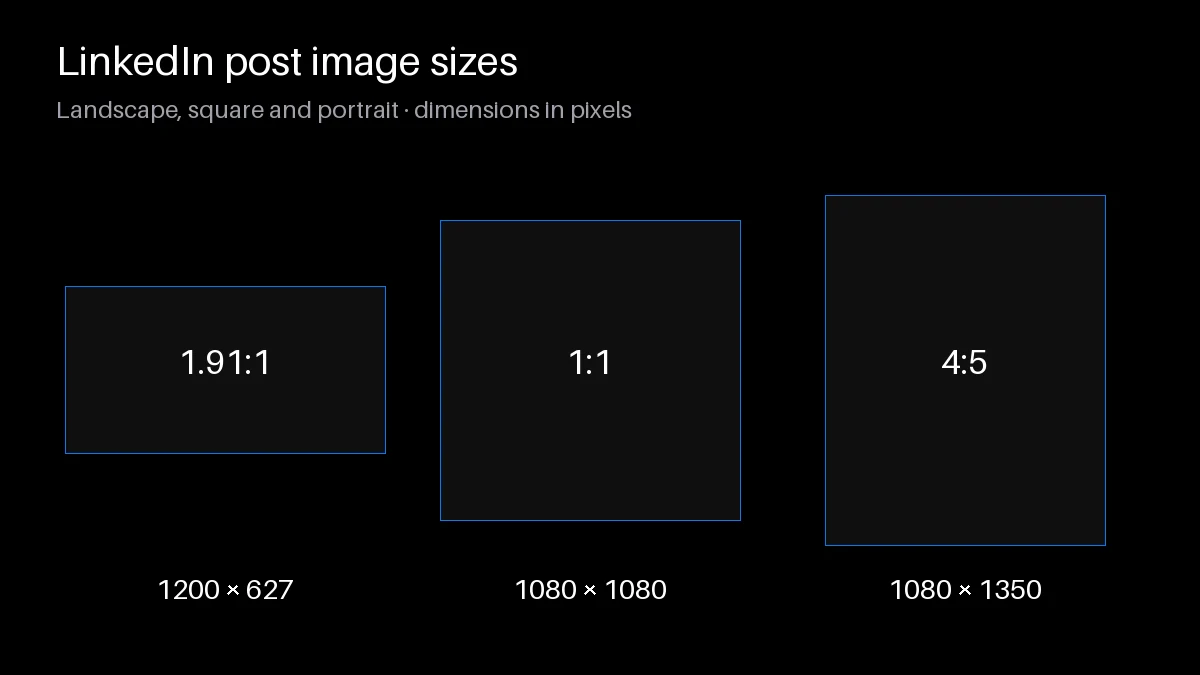
For a landscape graphic, use 1200 × 627, approximately 1.91:1. Square 1080 × 1080 and portrait 1080 × 1350 are useful design alternatives when the subject needs more vertical room. These are recommended canvases, not mandatory dimensions for every organic image post. Keep text large and test the actual feed preview.
For multiple images, use consistent proportions and make the first visual explain the collection. Avoid spreading one chart across separate attachments: readers may open them out of sequence. A document post is a different format. Export your slides as a PDF and upload through the document option; changing a filename does not turn a PDF into an image. See the LinkedIn carousel examples for page-by-page storytelling ideas.
LinkedIn video size and length
A practical production target is 3 seconds to 10 minutes, up to 5 GB, with resolution no greater than 4096 × 2304. The 10-minute ceiling appears in Page and Career Page guidance. Current native video upload help instead lists up to 15 minutes, with a 3-second minimum on desktop and 2 seconds on mobile. Check the destination before treating a production target as a platform maximum.
For a simple talking-head explanation, export a clear MP4, add captions, and keep labels away from the edges where controls may overlap. Watch the beginning with sound off. If the topic is unclear without narration, add a short opening title and make the accompanying post explain what viewers will learn.
Common LinkedIn image mistakes
The most expensive mistake is designing one file for every placement. A correct LinkedIn banner size will not make a wide header readable as a square post. Keep separate artboards for covers, posts, and document pages so you can reposition the same source elements without stretching them.
Avoid screenshotting finished designs, repeatedly saving JPGs, or placing tiny text over detailed photography. Export from the original file and compare the local export with the uploaded version. If a logo is soft locally, fix the source; if only the uploaded version looks soft, simplify fine detail and test another export. Add image descriptions for meaningful visuals, and repeat essential chart conclusions in the post copy.
Pair the image with a post
Use the LinkedIn Post Creator to draft an explanation that stands on its own. The LinkedIn text formatter can help with selective emphasis, while the LinkedIn headline generator helps align the profile promise with the cover. Avoid repeating every word of the image in the opening line.
ThreadMaster publishes LinkedIn profile posts immediately, including post-plus-comment chains; there is no scheduler for this channel. Scheduling, calendar, queue, evergreen, auto-plug, and analytics are X-only. Prepare the copy ahead of time, check the image in your chosen publishing workflow, and publish when you are ready to respond.
Frequently asked questions
What is the LinkedIn banner size?
A personal profile cover should be 1584 × 396 pixels, a 4:1 ratio. Company covers use a different shape and should be exported separately.
What size is a LinkedIn banner in inches or centimeters?
There is no fixed physical size on a screen. Use pixels. Inches and centimeters depend on the resolution setting in your design software and do not control the profile display.
Why does my banner look cropped on mobile?
The available width and profile-photo overlap change across layouts. Keep essential elements away from the edges and lower band, then inspect the saved profile on a phone.
Can I upload a PDF as an image?
Use the document-post option for a PDF. To upload an individual page as an image, export it as PNG or JPG and check that its text remains readable.
What is the best file format?
Use PNG for crisp lettering and flat graphics, and JPG for photographs when file size matters. Neither format can recover detail missing from the original source.
What size should my LinkedIn profile picture be?
Start at 400 × 400 pixels or larger, within 8 MB. Leave space around your face because the normal profile display uses a circular crop.
What image size works for a LinkedIn post?
Use 1200 × 627 for landscape, 1080 × 1080 for square, or 1080 × 1350 for portrait artwork. Preview multi-image layouts before publishing.
How long can a LinkedIn video be?
Current native-post help lists up to 15 minutes, while Page and Career Page guidance lists 10 minutes. A 3-second to 10-minute production target fits those duration ranges; verify the actual uploader.