LinkedIn writing reference
LinkedIn Character Limits: Posts, Headline, About, Comments, Articles

Updated
The LinkedIn character limit depends on the field: posts allow 3,000 characters, headlines 220, and the About section 2,600. A feed preview is shorter than the full post, so a draft can fit the technical allowance while hiding its most useful point behind 'see more'.
Use this reference to plan the opening, write complete supporting detail, and check the final version after formatting. Your goal is a message that reads naturally in its destination, whether that is a profile, a public conversation, or a private introduction.
LinkedIn character limit by field in 2026
These are drafting values to check against LinkedIn Help and the current editor. Some surfaces differ by account. LinkedIn's posts and articles documentation currently lists 125,000 for articles, so 110,000 is a conservative working budget rather than the current published maximum.
| Field | Characters | What to check |
|---|---|---|
| Post | 3,000 | Includes spaces and typed links |
| Feed preview | About 210 / three lines | Approximation; varies with screen and layout |
| Headline | 220 | Lead with the useful description |
| About / summary | 2,600 | Opening lines may be collapsed |
| Comment | 1,250 | Budget each comment independently |
| Article body | 125,000; 110,000 working budget | Separate from an ordinary post |
| Article title | 100 | Make the subject explicit |
| Company name | 100 | A Page field, not a profile headline |
| Direct message | 8,000 | Not the same as InMail |
| Connection note | 200 Basic / 300 Premium | Confirm the invitation dialog |
| Skill name | 50 each | Choose a recognizable skill label |
LinkedIn post character limit and the see-more preview
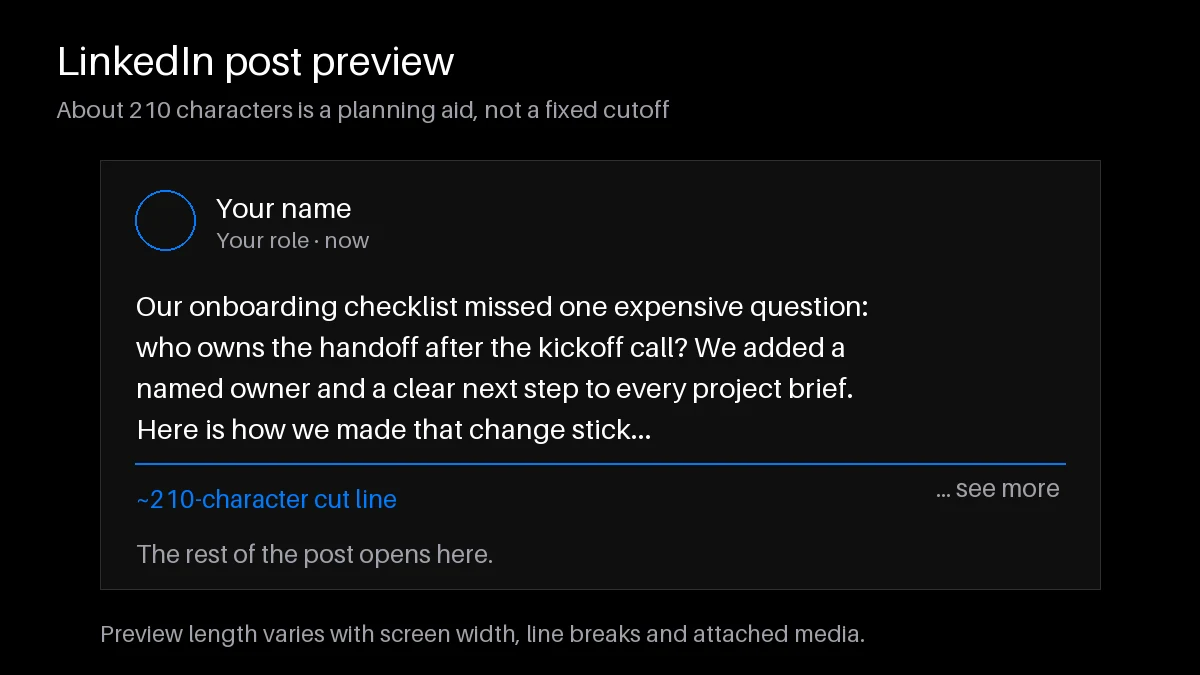
The LinkedIn post character limit is 3,000, including the visible text you add around a link or hashtag. Treat roughly 210 characters or three lines as an opening-preview planning aid, not a guaranteed cutoff. Blank lines, device width, attached media, and font rendering change what readers see. Put the specific problem and value in your first sentence. 'Our onboarding checklist missed one expensive question' sets up a story more clearly than several lines of greetings.
LinkedIn headline character limit: 220 characters
A headline appears in more places than your full profile, and those surfaces can truncate it. Start with your role, audience, or area of expertise. 'Operations consultant for growing service teams' is understandable before any supporting credentials. Use the remaining space for a specific specialty, not a row of decorative separators. Read the headline beside your name to catch repeated information. The LinkedIn character limit permits detail, but it does not require filling every available position.
LinkedIn summary character limit: 2,600 in About
The About section gives you room to explain who you help, how you work, and what experience supports that claim. Open with the reader's context, add a short example, then explain how to contact you. Separate paragraphs by topic so the text remains readable on a phone. The LinkedIn summary character limit is generous enough for a focused professional story, but a list of every past responsibility can bury your current direction. Remove achievements that no longer support the work you want.
Messages, connection notes, company names and skills
A regular direct message has a different budget from an invitation or InMail. Use 8,000 as the direct-message reference, then check the actual editor. LinkedIn's invitation comparison distinguishes 200-character Basic notes from 300-character Premium notes. Introduce the shared context before asking to connect. A company name field allows 100, while skill labels allow 50 each. Those are field references, not a promise that ThreadMaster edits profiles or publishes to Company Pages.
Ideal LinkedIn post length: what the limit does not tell you
There is no universal ideal length for every professional post. A clear hiring update may need a few lines; a useful project lesson may need the decision, its constraints, and an example. Draft the complete thought, then remove anything that does not help the intended reader understand or act. Do not add filler merely because a counter shows unused capacity.
For example, a project retrospective can explain the initial problem, the change you tried, and what you would repeat. Keep those three elements before adding background about the meeting where the idea started. Compare your own similar posts over time. The LinkedIn character limit is an upper boundary, not evidence that shorter or longer text automatically earns more engagement.
How to check your character count before posting
Paste the final draft into the LinkedIn text formatter, which includes a count, then inspect the result in LinkedIn. Count after adding hashtags, links, blank lines, or decorative text. Unicode styled letters are actual replacement characters, not a font applied to ordinary letters, and can affect counting and accessibility. Keep important names and search terms in plain text.
Do not assume every emoji counts as exactly one or exactly two. Some symbols contain multiple Unicode components, and a general-purpose counter may use different rules from a destination editor. Leave room for a final correction and treat the native composer as the final check. If the counts disagree, inspect unusual symbols and pasted spacing before removing useful sentences.
Write within the limit with the LinkedIn Post Creator
Use the LinkedIn Post Creator to turn a rough idea into a draft with a clear opening and logical order. Supply the audience, the specific lesson, and facts you can support. Review generated wording for invented achievements or claims before counting it. ThreadMaster publishes directly to LinkedIn profiles immediately. Its scheduling and analytics are X-only. Keep your final editing pass focused on accuracy, readability, and whether the opening delivers the promised topic.
Post + comment chain for ideas longer than 3,000
For an explanation that exceeds the LinkedIn character limit, place the central takeaway in the main post and supporting examples in a comment chain. The LinkedIn publishing feature supports profile posts and post-plus-comment chains. Keep each comment within its own allowance and make the main post useful independently. Readers may not open every comment, and conversation can affect what they see first. Use an article instead when the reader needs an uninterrupted document.
Frequently asked questions
What is the LinkedIn character limit for posts?
An ordinary post allows 3,000 characters. The feed may show only an opening preview until a reader expands it; that preview is not the publishing limit.
Does formatting count toward the limit?
Spaces, line breaks, and pasted Unicode styled text contribute to the text being counted. Check the final formatted draft rather than an earlier plain-text version.
Do emojis count double on LinkedIn?
Some emoji occupy multiple underlying text units, and combined emoji can use more. There is no safe universal double-count rule; validate your exact text in the native field.
Are hashtags included in the post limit?
Yes. The hash symbol, tag text, and separating spaces use the allowance. Add only relevant tags, then count the complete post again.
What is the LinkedIn headline character limit?
The headline allows 220 characters. Put the essential role or audience first because smaller previews can display less than the full headline.
How long can my LinkedIn summary be?
The About section, often called the summary, allows 2,600 characters. Use short paragraphs and put your current professional focus in the opening.
Is the connection note limit always 300?
No. Official help distinguishes 200 for Basic accounts and 300 for Premium. Check the counter in your invitation dialog before sending a personalized note.
Can ThreadMaster publish an idea longer than one post?
Yes, through a LinkedIn profile post plus comment chain. Each component must fit its own limit, and the main post should stand on its own.
LinkedIn comments and articles have separate limits
Budget 1,250 characters for a comment. Give a reply its own clear point instead of using it as an unannounced continuation. For an article, plan a title within 100 characters and use headings to support longer reading. Older references often cite 110,000 for article bodies; current official help lists 125,000. Neither figure is a recommended article length. Choose an article when a lasting, structured resource serves the reader better than an ordinary feed update.