Cross-platform writing reference
Social Media Character Limits (2026): X, LinkedIn, Threads, Facebook, Instagram, Bluesky, Mastodon

Updated
Social media character limits vary by platform and by field. A 500-character Threads post does not fit into an ordinary 280-character X post, and a LinkedIn introduction has a different job from an Instagram caption. Start with the destination, then decide what information the reader needs there.
This 2026 reference separates public posts, bios, names, replies, and image descriptions. Use the table to plan your draft, but check the native composer before publishing: account features, server settings, and the way a platform counts Unicode can change what fits.
Social media character limits: the comparison table
These social media character limits describe ordinary text fields unless noted. 'Check editor' means this guide does not assert a single verified allowance for that field; it does not mean unlimited. Names can have identity rules as well as length restrictions. Alt text is a separate accessibility field, and its space should describe the image rather than carry overflow marketing copy.
| Platform | Post / caption | Bio | Name | Comments / replies | Alt text |
|---|---|---|---|---|---|
| X | 280; Premium long posts 25,000 | 160 | 50 display; 4–15 handle | 280 standard reply | 1,000 per image |
| 3,000 | 2,600 About | Check name editor; headline 220 | 1,250 | Check image editor | |
| Threads | 500; separate text attachments 10,000 | 150 | Check profile editor | 500 ordinary reply | Check image editor |
| 63,206 | Check profile or Page field | Check account type | Check comment editor | Check image editor | |
| 2,200 caption | 150 | Check profile editor | Check comment editor | Check image editor | |
| Bluesky | 300 graphemes | 256 graphemes | 64 display-name graphemes | 300 graphemes | Check image editor |
| Mastodon | 500 default; server-dependent | Check server | Check server | Same server post limit | Check server / client |
X character limits: 280 standard, 25,000 Premium
On X, ordinary posts use a weighted 280-character allowance; eligible Premium long posts reach 25,000. URLs and emoji have special counting rules, so a generic text count is insufficient near the boundary. A profile bio has 160 characters, and the display name has 50. Put your main idea first, then split a longer explanation at complete thoughts. Review the current X Help reference when changing formats. Do not assume purchasing a subscription changes the limits of every profile field or removes the need to check individual thread posts.
LinkedIn character limits: 3,000 for a professional post
A LinkedIn post allows 3,000 characters, while a headline allows 220 and About allows 2,600. These are different writing surfaces: the headline introduces you, About supports that introduction, and a post contributes one idea to the feed. Links and hashtags consume post space. Treat the opening lines as a useful summary because the rest may be collapsed. For longer ideas, decide whether an article or a post with supporting comments is easier to follow. Re-check LinkedIn Help and the native editor when working near a boundary.
Threads character limit: 500 per post, 150 in your bio
The Threads character limit for an ordinary post is 500, and the bio allows 150. That gives a short explanation more room than a standard X post without turning it into an essay. Meta also introduced separate text attachments up to 10,000 characters; this does not make every ordinary post a 10,000-character field. Keep the core point in the post and use an attachment only when the additional reading serves a purpose. A connected series remains useful for distinct examples that invite separate conversation.
Facebook post character limit: 63,206 is a ceiling
The Facebook post character limit is 63,206 for ordinary post text. A large ceiling does not make a large block of copy easy to read, and other surfaces can have different constraints. Introduce the subject, divide supporting information into short paragraphs, and put essential event or service details where readers can find them. Check a Page's fields separately from a personal profile. ThreadMaster publishes to Facebook Pages; that support does not imply personal-profile publishing. When adapting a short thread, remove repeated numbering and transitions that only made sense between separate posts.
Instagram caption character limit: 2,200, with a 150-character bio
Instagram captions allow 2,200 characters, and bios allow 150. Write the caption around the image or video the reader is seeing: explain the useful detail, add context that the visual cannot show, and make any next action specific. A caption copied from another network may refer to a missing link or a thread that does not exist here. Add hashtags before your final count, since they use text space. Keep image descriptions in the accessibility field and review them independently. Instagram is included as a writing reference, not as a ThreadMaster publishing destination.
Bluesky character limit: 300 graphemes per post
Bluesky posts allow 300 graphemes, meaning units intended to correspond to user-perceived characters. That distinction matters for emoji composed of several underlying code points. Its profile schema separately allows 256 graphemes for the description and 64 for the display name. Do not import X's fixed URL-counting rule into a Bluesky draft. Check the actual composer, including any link you leave in the text. A 280-character X draft is a useful starting point, but it is not proof that the same text fits here unchanged.
Mastodon character limit: 500 by default, with server differences
Mastodon's posting documentation gives a default limit of 500 characters. Servers can offer different allowances, so your own composer is more useful than a universal chart when the two disagree. Replies are posts and follow the relevant server's rules. Content warnings, mentions, and links also need attention during the final check. Write for the community you are joining instead of copying a promotional sequence without context. Use meaningful image descriptions, and check your server's profile fields separately rather than assuming another instance has identical settings.
Cross-posting one draft across limits
Begin with a source draft containing the claim, evidence, example, and intended action. Then create a separate version for each destination. Social media character limits should guide the packaging, not determine which facts survive. If a short version cannot preserve an important qualification, narrow the claim or link to a complete explanation instead of making it misleading.
ThreadMaster's thread splitter splits drafts for X and Threads. Select the destination and review the breaks; a 500-character Threads segment may need more than one ordinary X post. Use the character counter after adding actual links and numbering. For LinkedIn, keep the main post within 3,000 and make supporting comments independently understandable.
For example, turn a product lesson into a short X sequence with one example per post, a Threads conversation with a broader opening, and a LinkedIn account of the decision and tradeoff. The Threads vs Twitter guide helps frame the audience differences. ThreadMaster publishes to X, Threads, Facebook Pages, and LinkedIn profiles; scheduling, calendar, queue, evergreen, auto-plug, and analytics are X-only.
Before publishing, inspect mentions, destinations, and any sentence that says 'below' or 'in the next post'. Those references often break during adaptation. Keep a saved version for each platform, and review the final native preview. Social media character limits are only one part of a successful transfer: the copied post also needs the right context, media, and reader expectation.
Frequently asked questions
What are the main social media character limits?
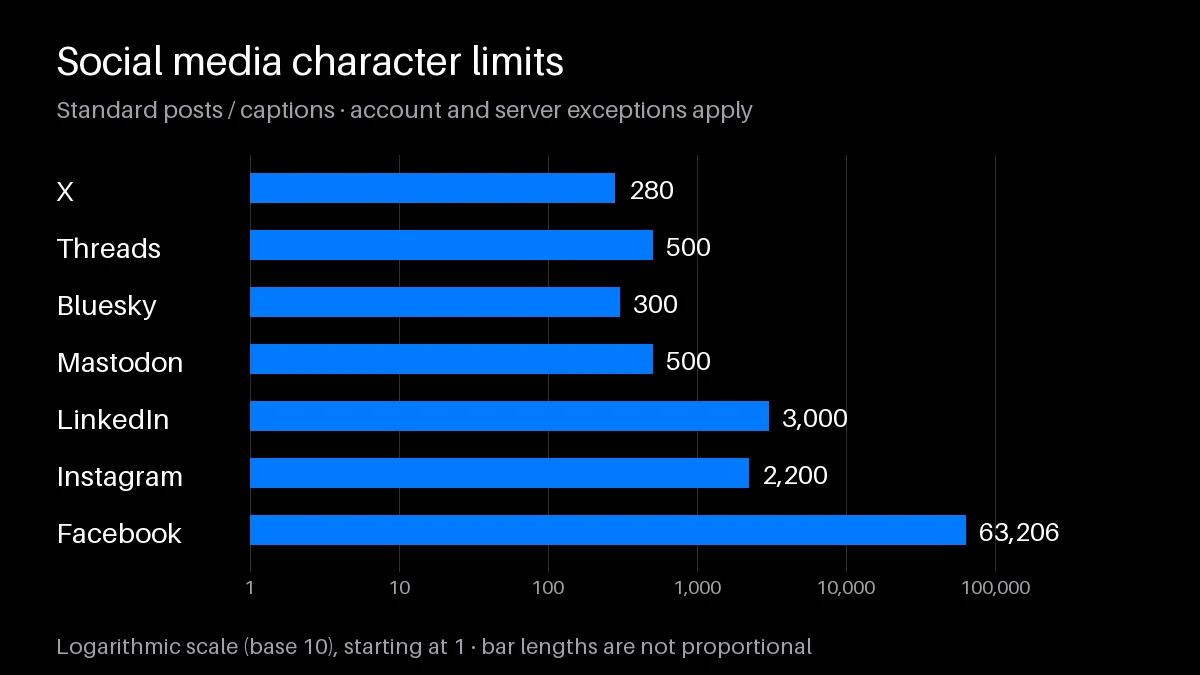
Standard posts allow 280 on X, 3,000 on LinkedIn, 500 on Threads, 63,206 on Facebook, and 300 on Bluesky. Instagram captions allow 2,200; Mastodon's default is 500.
What is the Threads character limit?
Ordinary Threads posts allow 500 characters. Separate long-text attachments can hold up to 10,000, and the profile bio has a 150-character allowance.
How long can a Facebook post be?
The ordinary text-post ceiling is 63,206 characters. Check the destination surface and keep the post structured for readers rather than filling the available space.
Do spaces and hashtags count?
Yes, include them in your draft count. Platform-specific treatment of URLs and Unicode means the same visible text can have different measured lengths across networks.
Can I paste one draft into every network?
You can reuse the central idea, but adapt length, mentions, links, and context. Check each native composer instead of trusting a count from a different platform.
Does alt text share the post's character budget?
Alt text is generally entered in a separate field with its own rules. Describe the image's relevant information, and check the image editor for the available allowance.
Why does my Mastodon server allow more than 500?
Five hundred is the default, not a universal server requirement. Your server can configure a different limit; its composer should show the allowance available to you.
Does ThreadMaster publish to all seven platforms here?
No. ThreadMaster publishes directly to X, Threads, Facebook Pages, and LinkedIn profiles. Instagram, Bluesky, and Mastodon are included here for comparison and manual drafting.
Keep exploring
Twitter character limit
Inspect X posts, profiles and weighted length.
LinkedIn character limits
Plan professional copy field by field.
Character counter
Measure each platform version.
Thread splitter
Split a source draft for X or Threads.
Twitter Thread Generator
Draft a sequence for X.
LinkedIn Post Creator
Build a professional post from your idea.